Appearance
Creating a Meeting Poll
The poll creation form lets you define your meeting details and propose date options for participants to vote on.
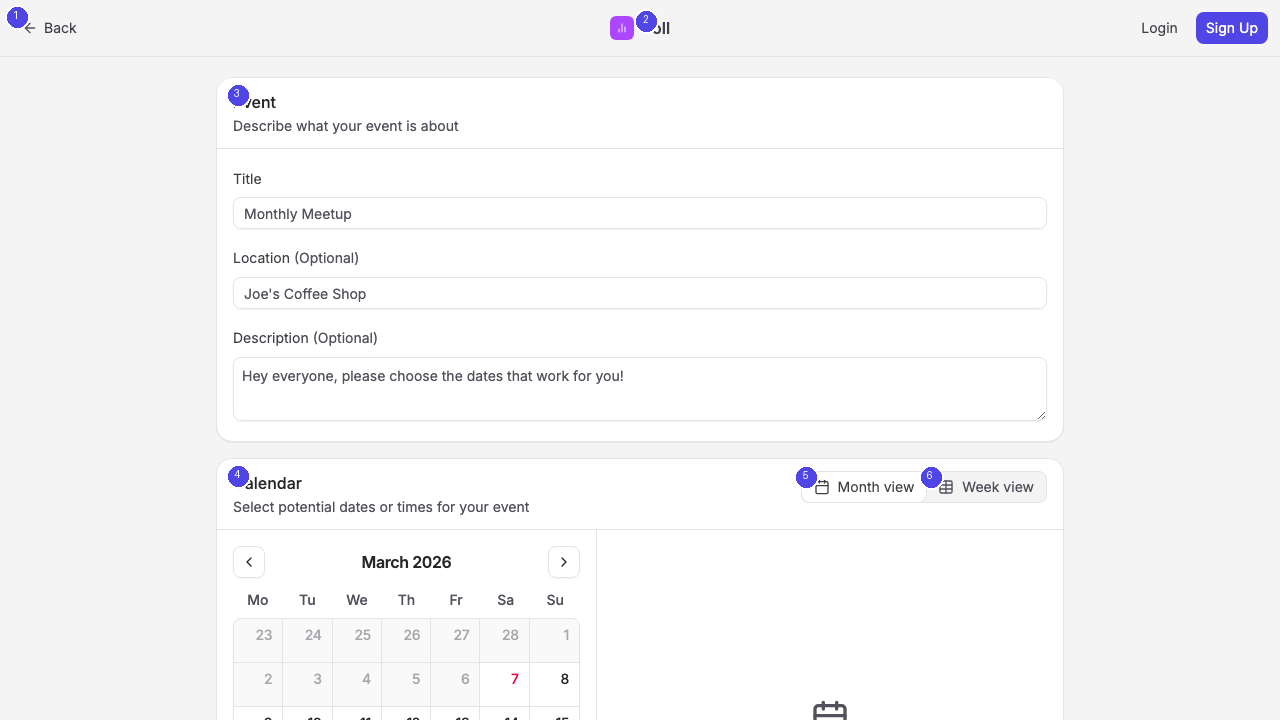
Event Details
The Event section [3] at the top of the form includes three fields:
- Title (required) — Give your poll a descriptive name, such as "Team Standup" or "Project Kickoff Meeting"
- Location (optional) — Add a physical address, video call link, or room name
- Description (optional) — Provide additional context about the meeting agenda or purpose
Selecting Dates
The Calendar section [4] displays a monthly calendar where you select the dates you want to propose. Click on individual dates to add them as options. Selected dates appear highlighted.
You can switch between Month view [5] and Week view [6] depending on your preference. The Month view gives a broader overview, while the Week view provides more detail for selecting specific time slots.
To include specific start and end times for each option, enable the Specify times checkbox below the calendar. This is useful when you need to propose specific time slots rather than full days.
Poll Settings
The Settings section [7] offers several configuration options:
- Disable comments — Turn off the comment section on your poll
- Make email address required for participants — Require participants to provide their email when voting
- Hide participant list from other participants (Pro) — Keep votes private between the organizer and individual participants
- Hide scores until after a participant has voted (Pro) — Prevent participants from seeing current vote tallies before they vote, reducing bias
Submitting Your Poll
Once you have filled in the event details and selected your date options, click the Create Poll button [8] at the bottom of the page. Rallly generates a shareable link that you can send to your participants.
If you are logged in, the poll appears in your dashboard where you can track responses and manage it. If you created the poll as a guest, bookmark the admin link provided after creation — this is the only way to manage your poll later.